
Warning: translations_api(): An unexpected error occurred. Something may be wrong with WordPress.org or this server’s configuration. If you continue to have problems, please try the support forums. (WordPress could not establish a secure connection to WordPress.org. Please contact your server administrator.) in /var/www/html/wp-includes/functions.php on line 6121

WordPress databasefejl: [Can't find record in 'wp_options']
SELECT option_name, option_value FROM wp_options WHERE option_name IN ('_site_transient_wp_theme_files_patterns-ea1e15a21f0fea2c059f521fc6eda4e5','_site_transient_timeout_wp_theme_files_patterns-ea1e15a21f0fea2c059f521fc6eda4e5')

WordPress databasefejl: [Duplicate entry '_site_transient_wp_theme_files_patterns-ea1e15a21f0fea2c059f521f' for key 'wp_options.option_name']
INSERT INTO `wp_options` (`option_name`, `option_value`, `autoload`) VALUES ('_site_transient_wp_theme_files_patterns-ea1e15a21f0fea2c059f521fc6eda4e5', 'a:2:{s:7:\"version\";s:0:\"\";s:8:\"patterns\";a:2:{s:22:\"ans%c3%b8g-nu-card.php\";a:3:{s:5:\"title\";s:14:\"Ansøg nu card\";s:4:\"slug\";s:25:\"newbro/ans%c3%b8g-nu-card\";s:11:\"description\";s:0:\"\";}s:11:\"vaskeri.php\";a:4:{s:5:\"title\";s:7:\"Vaskeri\";s:4:\"slug\";s:14:\"newbro/vaskeri\";s:11:\"description\";s:0:\"\";s:10:\"categories\";a:1:{i:0;s:7:\"Buttons\";}}}}', 'off') ON DUPLICATE KEY UPDATE `option_name` = VALUES(`option_name`), `option_value` = VALUES(`option_value`), `autoload` = VALUES(`autoload`)

Windows 7Windows 7 – Nybrogård Kollegiet

Windows 7Windows 7

Find det lille computer icon i bundlinien og dobbelt klik.
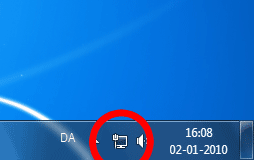
Wireless Icon in taskbar

Et nyt vindue åbnes.
Vælg “K-Net” fra listen og dobbelt klik.
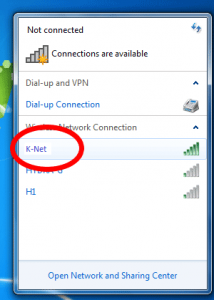
win7_2_knet

Et nyt vindue åbnes.

Udfyld felterne med dit brugernavn, password og klik OK
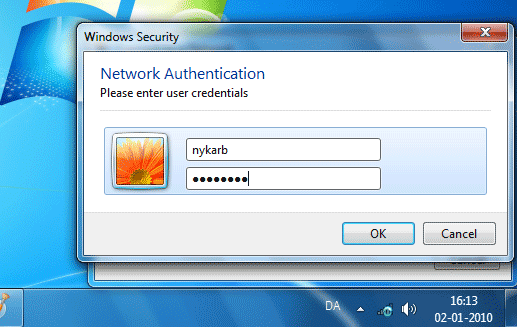
Username, Password and OK

En advarsel kommer op, vælg Tilslut.
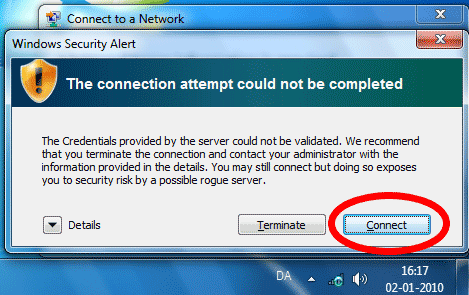
Connect

Et nyt vindue kommer frem.
Vælg Offentligt netværk eller det felt som har en bænk som icon.
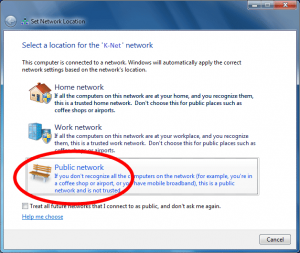
win7_5_knet

Skulle der herefter være problemmer, kontakt os da pr. mail eller i kontortiden.Find the little computer icon in the notification area and double click on it.

Wireless Icon in taskbar

A new window opens.
Double click on “K-Net” in the list.

win7_2_knet

A new window opens.
Fill in the fields with your username and password, and click OK.

Username, Password and OK

A warning pops up, select Connect.

Connect

A new window opens.
Select Public network

win7_5_knet

If there are further problems, then contact us via mail or in the office hours.

Denne side er sidst blevet redigeret d.